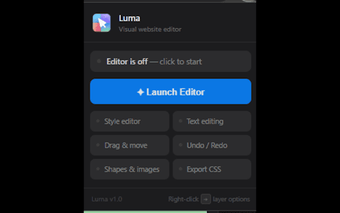
Luma: Visual Website Editor for direct, no-code page edits in Chrome
Luma - Visual Website Editor, from Luma, is a Chrome extension that turns live webpages into an editable canvas for rapid visual prototyping and on-page testing. The extension provides point-and-click, no-code editing of text, images, and layout with a Canva-like editing surface and real-time updates. Aimed at UI designers, digital marketers, and non-technical editors, it helps teams preview copy and layout changes without touching source code.
What Luma does and who it suits
Luma edits live pages in the browser by letting users select and modify page elements directly on any site, which supports text, images, and style adjustments. The tool frames itself as a visual, no-code alternative to static mockups, designed for quick prototyping and copy testing. The interface borrows familiar Canva patterns so people with design experience can start editing with minimal setup.
How Luma behaves during in-browser edits
Live changes render immediately, so edits appear on the open page in real time rather than in a separate preview. The extension is described as lightweight and integrates into the Chrome workflow on desktop platforms, which makes it suitable for short design iterations performed directly in the browser. That model prioritizes instant visual feedback over offline or server-based rendering.
Can non-technical users prototype without code?
No-code point-and-click editing is central: users can change copy, swap images, and adjust layout without writing HTML or CSS. The Canva-like approach reduces the learning curve for marketers and non-technical editors who need fast visual experiments. For UI professionals, the tool provides a quick way to validate ideas on a live page before handing changes to a development pipeline.
How Luma fits into existing design workflows
Luma shortens the preview loop by moving visual iteration onto the live page, which helps stakeholders see adjustments in context. It is positioned as a prototyping and visualization tool rather than a site-deployment system. Teams that rely on browser-based previews or rapid A/B copy tests get an immediate way to vet design choices on actual pages without building separate mockups.
Clear choice for fast visual prototyping, with a platform limit
Luma is a practical option for designers and marketing teams who need immediate, on-page previews of copy and layout changes. Its scope favors rapid visual iteration inside Chrome on desktop, which makes it less suitable for workflows requiring native mobile previews or integrated cross-device sync. For browser-based prototyping and stakeholder reviews, it provides a direct, low-friction path to test ideas.